Home / 10.0.0.0.1
10.0.0.0.1 Piso WiFi: Why It Fails and the Correct Address
Updated November 2026
10.0.0.0.1 is not a real address, so it will never open a Piso WiFi portal. The correct address is http://10.0.0.1, with three dots and four numbers.
Quick answer: Remove one zero. Connect to the Piso WiFi network, turn off mobile data, and type http://10.0.0.1 in the browser address bar. From there you can pay, check your time, and tap Pause Time.
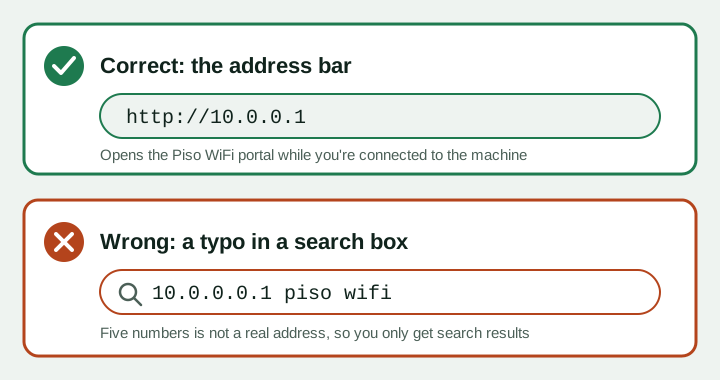
Why 10.0.0.0.1 piso wifi does not work
Every local network address on your phone uses a format called IPv4. An IPv4 address always has exactly four numbers. 10.0.0.0.1 has five, so your browser cannot treat it as an address.
Instead, the browser sends it to Google as a search. That is why you see search results, not your remaining time. It is also why "10.0.0.0.1 pause time" and "10.0.0.0.1 wifi pause" are such common searches.
Sobra ng isang zero ang 10.0.0.0.1. Ang tama ay 10.0.0.1.
How IP addresses work, in simple words
Think of an IP address as a house number for a device on a network. The vendo machine has one, and so does your phone.
- It has four numbers, separated by three dots.
- Each number is from 0 to 255.
- No spaces, no dashes, no letters.
| Address | Count of numbers | Valid? |
|---|---|---|
| 10.0.0.1 | 4 | Yes |
| 10.0.0.0.1 | 5 | No |
| 1.0.0.0.0.1 | 6 | No |
| 10.000.1 | 3 | No |
| 10.0.0.256 | 4, but 256 is too high | No |
Addresses starting with 10 are private. They only exist inside a local network, like the one the vendo creates. That is why 10.0.0.1 only opens when you are connected to the machine.
Every 10.0.0.0.1 typo variant and the fix
These are the spellings people type most. All of them should become 10.0.0.1, unless your machine uses another gateway.
| What you typed | What is wrong | Type this instead |
|---|---|---|
| 10.0.0.0.1 piso wifi, 10.0.0.0.1 piso wifi time | Five numbers | 10.0.0.1 |
| 10.0.0.0.1 pause time, 10.0.0.0.1 wifi pause | Extra zero | 10.0.0.1, then tap Pause Time |
| 1.0.0.0.1 piso wifi pause, 1.0.0.0.1 pause time | Missing the 0 in 10, extra zero | 10.0.0.1 |
| 10.0 0.0 1 piso wifi time | Spaces instead of dots, extra zero | 10.0.0.1 |
| 10.0-0.0-1 | Dashes are not allowed | 10.0.0.1 |
| 1.0-0.0-1 pause time | Dashes, wrong first number | 10.0.0.1 |
| 1.0.0.0.10 | Five numbers, digits shuffled | 10.0.0.1 |
| 1.0.0.0.0.1 | Six numbers | 10.0.0.1 |
| 01.01.01 piso wifi | Three numbers, wrong values | 10.0.0.1 |
| 1001, 101, 10001 piso wifi | No dots at all | 10.0.0.1 |
| 10.000.1 | Only three numbers | 10.0.0.1 |
| 1.00.01 | Only three numbers | 10.0.0.1 |
| 10.0.0.l (letter l) | Letter instead of the number 1 | 10.0.0.1 |
Your phone keyboard may add spaces after dots or swap 1 for l. Check the address bar before pressing Go.
How to open the Piso WiFi portal correctly
- Connect to the vendo's WiFi. You must be on its network. On mobile data, 10.0.0.1 leads nowhere.
- Turn off mobile data and VPN. This stops your phone from bypassing the portal.
- Tap the address bar. Use the bar at the top of Chrome, Safari or Samsung Internet. Avoid the Google widget on your home screen.
- Type the full address. Enter http://10.0.0.1 exactly, then press Go.
- Use the portal. Pay, check your time, or pause. Our pause time guide shows each button.
Browser-specific steps are on the Piso WiFi login page. If you use an LPB machine, see the LPB Piso WiFi guide.
Never mistype the portal address again
- Bookmark it. Once the portal loads, save it as a bookmark named "Piso WiFi".
- Add it to your home screen. In Chrome, open the menu and tap "Add to Home screen". One tap opens the portal next time.
- Count the dots. Three dots, four numbers. If you see more, delete the extra.
- Check the sign. Many owners post the exact address on the vendo itself.
10.0.0.1 still not opening? Find your real gateway
Some machines use a different address, such as 10.10.0.1 or 10.10.10.1. Your phone already knows the right one. It is called the gateway or router address.
| Device | Where to look |
|---|---|
| Android | Settings, WiFi, tap the connected network (or the gear icon), look for Gateway or Router |
| iPhone | Settings, Wi-Fi, tap (i), look for Router |
| Windows | Open Command Prompt, type ipconfig, read Default Gateway |
| Mac | System Settings, Wi-Fi, Details, TCP/IP, read Router |
Type that number in the address bar with http:// in front. Labels differ by phone brand. More on this in 10.10.0.1 and other portal addresses.
Correct address, but still a problem?
- Page loads forever: set Private DNS to Off or Automatic on Android.
- "Not secure" or certificate warning: make sure you typed http, not https.
- No pause button: the owner disabled it. Customers cannot turn it on.
- Machine not responding: ask the owner to restart it.
Pause only saves time you already paid for. No address gives free internet. For other issues, read Piso WiFi not working.
10.0.0.0.1 Piso WiFi FAQs
Is 10.0.0.0.1 the Piso WiFi address?
No. It has five numbers, which is not a valid address. The correct one is 10.0.0.1.
How do I pause time if 10.0.0.0.1 doesn't work?
Type http://10.0.0.1 in the address bar while connected to the machine. Then tap Pause Time.
Why does 10.0.0.0.1 open Google?
Your browser cannot read it as an address, so it searches for it instead.
What about 1.0.0.0.1 pause time?
That is also a typo. Use 10.0.0.1 for the portal and pause button.
Is 10.0 0.0 1 with spaces okay?
No. Spaces break the address. Type the dots with no spaces: 10.0.0.1.
Can an IP address have a number above 255?
No. Each of the four numbers must be between 0 and 255.
What if 10.0.0.1 also fails?
Check the gateway in your WiFi settings. Your machine may use 10.10.0.1 or another address.