Home / 10.0.0.1 login
Piso WiFi Login: How to Open the 10.0.0.1 Portal
Updated November 2026
Piso WiFi login means opening the vendo's portal page at http://10.0.0.1 while connected to its WiFi. There you start your session, check your time, and use pause time.
Quick answer: Connect to the Piso WiFi network, turn off mobile data, and type http://10.0.0.1 in your browser's address bar. Customers need no username or password. Only the owner logs in with an account, on the separate admin page.
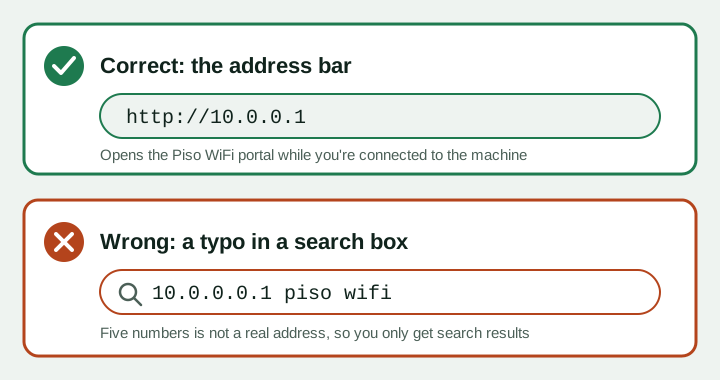
Customer login vs owner admin login
There are two different "logins" on a Piso WiFi machine. Mixing them up is the most common reason people get stuck.
| Customer portal | Owner admin | |
|---|---|---|
| Who uses it | Anyone buying time | The vendo owner only |
| Address | http://10.0.0.1 | Often http://10.0.0.1/admin (varies) |
| Username and password | No | Yes |
| What you can do | Pay, see time, pause, resume | Rates, pause settings, WiFi name, sales |
As a customer, your "login" is simply your phone. The machine recognizes your device by its MAC address. No account is needed.
How to log in to the Piso WiFi portal
- Connect to the vendo's WiFi. Pick the network in Settings, then WiFi. It is often the store name or "Piso WiFi".
- Turn off mobile data and VPN. Both can stop the local page from loading.
- Use the pop-up if it appears. Tap "Sign in to network" or "Sign in to Wi-Fi network".
- Otherwise type the address. Enter http://10.0.0.1 in the address bar, not the search box.
Writing it "http //10.0.0.1/" without the colon will not work. Type http, a colon, two slashes, then 10.0.0.1.
Piso WiFi login per browser
Any browser can open the portal. Each one hides a setting that can block it, so here is what to check.
Chrome (Android)
- Tap the address bar and type http://10.0.0.1. Press Go.
- If Chrome changes it to a Google search, add http:// at the start.
- For Chrome Piso WiFi pause time, open the same page after paying and tap Pause Time.
- If the page is blank, open a new Incognito tab and try again.
Samsung Internet
- Type the address in the top bar. Samsung Internet may suggest a search; ignore it and press Go.
- Turn off any ad blocker or "Secret mode" extension if the page fails.
Safari (iPhone and iPad)
- iOS usually opens the portal in a small window after you join. Pay and pause from there.
- If that window closes, open Safari and type http://10.0.0.1.
- Turn off Private Wi-Fi Address for this network so your session does not reset.
Windows 10 and 11 (Edge or Chrome)
- After connecting, Windows may open a browser by itself. If not, open Edge or Chrome.
- Type http://10.0.0.1 and press Enter.
- Disconnect any VPN and turn off "secure DNS" in browser settings if the page will not load.
- Your laptop is a separate device. It needs its own payment.
Browser Piso WiFi pause time works the same everywhere: open the portal on the device that paid, then tap Pause Time. Full steps are on our pause time guide.
The captive portal pop-up
A captive portal is the page that appears by itself when you join a paid WiFi. Your phone tests the internet, sees it is blocked, and shows the vendo's page.
- Pop-up shows: use it. It is the same as opening 10.0.0.1.
- Pop-up closes after paying: that is normal. Open the browser to use the internet.
- No pop-up: type the address yourself. Many Android phones skip the pop-up when mobile data is on.
Walang lumabas na page? I-type ang http://10.0.0.1 sa address bar ng browser.
Logout vs pause
Some portals show both Logout and Pause. They do very different things.
| Button | Timer stops? | Time saved? |
|---|---|---|
| Pause Time | Yes | Yes, until you resume or the pause limit ends |
| Logout | Yes | Usually lost |
| Closing the browser | No | Time keeps running |
Tap Pause, not Logout, if you plan to come back. Pause only saves paid minutes. It never adds free time.
Owner admin login
Owners manage the machine from an admin page. The path depends on the system. On many machines it is 10.0.0.1/admin, but check your manual.
- Connect to the machine. Use its WiFi or a LAN cable.
- Open the admin address. Type it in the browser address bar.
- Sign in. Use the account from your seller. We do not list default passwords; change yours if it is still the factory one.
- Log out when done. Never leave the admin page open on a shared device.
System-specific owner steps: LPB Piso WiFi and AdoPiSoft. This site is an independent guide and is not affiliated with any of them.
Piso WiFi login page not loading
| What you see | Cause | Fix |
|---|---|---|
| Google search results | Typed in the search box | Type http://10.0.0.1 in the address bar |
| "This site can't be reached" | Not on the vendo WiFi, or a different gateway | Reconnect, then check the gateway address |
| Page loads forever | Mobile data or Private DNS is on | Turn off data; set Private DNS to Off or Automatic |
| "Your connection is not private" | Browser forced https | Type http:// (not https) before the address |
| Portal opens, then time resets | Random MAC address | Turn off Private or Randomized MAC for this network |
| Nothing works | Machine is down | Ask the owner to restart the vendo |
Typed 10.0.0.0.1? That address has five numbers and cannot work. Read why 10.0.0.0.1 is a typo. If your machine uses another address, see 10.10.0.1 and other gateways. More fixes are in Piso WiFi not working.
Piso WiFi login FAQs
What is the Piso WiFi login address?
Most machines use http://10.0.0.1. Type it in the browser address bar while connected to the vendo's WiFi.
Do I need a username and password?
No. Customers just open the portal. Only the owner uses a username and password, on the admin page.
How do I log in for Piso WiFi pause time?
Open 10.0.0.1 on the phone that paid and tap Pause Time. Open it again and tap Resume to continue.
Is 10.0.0.0.1 the Piso WiFi portal login?
No. It has one zero too many. The correct address is 10.0.0.1.
Why does the login page not pop up on Android?
Mobile data is often the cause. Turn it off, reconnect to the WiFi, or type the address yourself.
How do I open the portal on Windows 10?
Connect to the WiFi, open Edge or Chrome, and type http://10.0.0.1. Turn off any VPN first.
Is logging out the same as pausing?
No. Logout usually ends your session and your time is lost. Pause saves the remaining minutes.
Can I log in to my session from another phone?
No. Sessions are tied to the device that paid, so each phone needs its own time.