Home / LPB Piso WiFi
LPB Piso WiFi: 10.0.0.1 Pause Time, Login and Admin Guide
Updated November 2026
LPB Piso WiFi is one of the most common coin-operated WiFi systems in Philippine sari-sari stores. Its customer portal opens at http://10.0.0.1, where you pay, check your time, and pause or resume your session.
Quick answer: Connect to the LPB WiFi network, turn off mobile data, and type http://10.0.0.1 in the browser address bar. Insert a coin or enter a voucher, then tap Pause Time when you want to stop the clock. Open the same page on the same phone and tap Resume to continue.
This is an independent guide. We are not affiliated with LPB or any vendo seller.
What is LPB Piso WiFi?
LPB is a Piso WiFi software and machine brand. The vendo box has a coin slot, a small board running the LPB system, and a WiFi antenna. Store owners connect it to their home internet and sell time by the peso.
For customers, LPB means one thing: a portal page at 10.0.0.1. That page shows your remaining time and buttons such as Insert Coin, Voucher and Pause Time. People also search for it as "LPB WiFi", "lpb.wifi", or mistype it as "LBS Piso WiFi" and "LBP Piso WiFi".
How to tell if your machine is LPB
- The WiFi name often includes "LPB" or the store name.
- The portal page shows an LPB logo or "LPB Piso WiFi" text.
- The portal opens at 10.0.0.1, or on some older units at 10.10.10.1.
A round countdown circle suggests AdoPiSoft instead.
How to connect to LPB Piso WiFi at 10.0.0.1
- Join the network. Open Settings, then WiFi, and tap the vendo's network name. Most LPB machines have no WiFi password.
- Turn off mobile data. With data on, Android may route around the portal and the page will not load.
- Wait for the pop-up. Many phones show "Sign in to network". Tap it to open the LPB portal.
- Or open it yourself. Type http://10.0.0.1 in the Chrome or Safari address bar. Do not type it in the Google search box.
- Check the page. You should see your device, your time (zero before paying) and the payment buttons.
"Connected, no internet" on your phone is normal before you pay. It does not mean the machine is broken.
For browser-by-browser steps, see our Piso WiFi login guide.
Paying on the LPB portal: coin, voucher or GCash
Insert coin
- Tap Insert Coin. The portal starts a short countdown, often 30 to 60 seconds, to wait for your coins.
- Drop your coins. Use ₱1, ₱5 or ₱10 coins, depending on what the slot accepts. The screen adds minutes as each coin registers.
- Tap Done or Start. Your session begins and the internet opens.
Only one phone can use the coin slot at a time. If someone else tapped Insert Coin first, wait for their countdown to end.
Voucher code
Some stores sell printed or written codes. Tap Voucher on the LPB portal, type the code exactly, and submit. The time loads onto the phone you are using. More on this in our Piso WiFi voucher guide.
GCash or e-wallet
Newer LPB setups may show a GCash or QR option if the owner enabled it. Follow the on-screen QR or reference steps. If there is no such button, the owner has not turned it on. See paying Piso WiFi with GCash for details.
Typical LPB rates
The owner sets the rates, so they differ per store. The table shows common examples only.
| Payment | Example time | Notes |
|---|---|---|
| ₱1 | 8 to 15 minutes | Good for quick checks |
| ₱5 | 1 to 1.5 hours | Some owners add bonus minutes |
| ₱10 | 2.5 to 4 hours | Often the best value |
| ₱20 to ₱50 voucher | 1 day to several days | Usually sold over the counter |
LPB Piso WiFi pause time: pause and resume
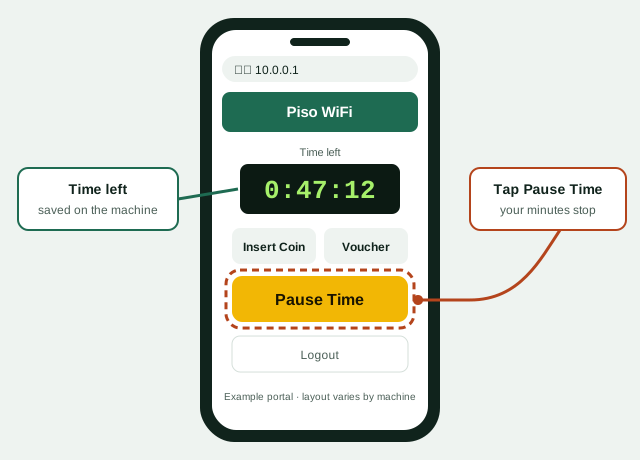
LPB pause time freezes your countdown. Your internet stops and the remaining minutes stay saved on the machine. Pause only saves time you already paid for. It does not add free time.
- Open the portal. Stay connected and go to http://10.0.0.1.
- Tap Pause Time. On most LPB versions it sits under your remaining time.
- Confirm the timer stopped. The button usually changes to Resume or Resume Time.
- Come back and resume. Reconnect, open the same page on the same phone, and tap Resume.
Sa LPB, pindutin ang Pause Time sa 10.0.0.1. Para ituloy, buksan ulit at pindutin ang Resume.
LPB pause rules to know
- No button? The owner turned pause off. Customers cannot enable it.
- Time limits. Many owners set a maximum pause, often 30 to 60 minutes. After that, the timer may restart by itself.
- Same device only. Your session is tied to your phone's MAC address. Another phone cannot resume it.
- Turning off WiFi is not pausing. On most machines the clock keeps running.
For pause on every brand, read our main Piso WiFi pause time guide.
LPB admin page for owners
The owner side of LPB is a separate admin page. Customers do not need it. The steps below are general. Menu names vary by LPB version.
- Connect to the machine. Join its WiFi, or plug a laptop into its LAN port.
- Open the admin address. On many units it is http://10.0.0.1/admin. Your seller or the manual will confirm the exact path.
- Log in. Use the admin account your seller gave you. We do not publish default logins. Change the password right away if it is still the factory one.
- Change rates. Look for a section often called Rates or Pricing. Set minutes per peso and save.
- Enable pause. In portal or session settings, turn on the pause option and set a maximum pause length.
- Change the WiFi name. Look under network or wireless settings for the SSID. Use your store name so customers can find you.
- Test it. Drop ₱1 on your own phone, then pause and resume to check everything works.
If you lost the admin password, contact your seller first. A factory reset may wipe your rates and sales data. See how to reset a Piso WiFi machine before you try it.
LPB Piso WiFi troubleshooting
| Problem | Likely cause | Fix |
|---|---|---|
| 10.0.0.1 won't open | Mobile data, VPN or Private DNS is on | Turn them off and type http://10.0.0.1 again |
| Google results appear instead | Typed in the search box | Use the address bar and add http:// |
| Coin dropped but no time | Insert Coin countdown ended, or coin rejected | Ask the owner to check the sales log |
| "Coin slot busy" | Another user is inserting coins | Wait a minute and try again |
| Voucher invalid | Typo, used code, or expired | Retype carefully, then ask the seller |
| No Pause Time button | Pause disabled by owner | Ask the owner to turn it on |
| Time reset after reconnecting | Private WiFi address changed your MAC | Turn off random MAC for this network |
| Paid but slow internet | Many users, or the owner's ISP is slow | Try later or move closer to the machine |
Still stuck? Our full Piso WiFi not working page has more fixes.
LPB spelling and address variants
Many people type LPB or its address slightly wrong. Here is what each one means.
| What people type | Valid? | What to use |
|---|---|---|
| lpb piso wifi 10.0.0.1 | Yes | http://10.0.0.1 |
| lbs piso wifi | No | Means LPB. Open http://10.0.0.1 |
| lbp piso wifi, lbp 10.0.0.1 | No | Letters swapped. Use http://10.0.0.1 |
| lpb.wifi | Sometimes | Works only if the owner set that name. Otherwise use 10.0.0.1 |
| lpb.wifi 10.0.0.1 | No | Type one address only: http://10.0.0.1 |
| 10.10.10.1 | Yes, on some units | Try it if 10.0.0.1 fails |
| 10.10.10.l | No | Last character is the number 1, not the letter l |
| 10.0.0.0.1 | No | Extra zero. See 10.0.0.0.1 explained |
LPB Piso WiFi FAQs
What is the LPB Piso WiFi address?
Most LPB machines use http://10.0.0.1. A few older setups use 10.10.10.1. Check your WiFi gateway if neither opens.
How do I pause time on LPB Piso WiFi?
Open 10.0.0.1 while connected and tap Pause Time. To continue, open the same page on the same phone and tap Resume.
Is LBS Piso WiFi the same as LPB?
Yes. "LBS" and "LBP" are common misspellings of LPB. The portal address is the same.
Does lpb.wifi work?
Only on machines where the owner set it up. If it does not load, type http://10.0.0.1 instead.
Why is there no pause button on my LPB portal?
The owner has turned pause off in the admin settings. Only the owner can enable it.
Can I get free time on LPB Piso WiFi?
No. Pause only saves time you already paid for. Any tool that claims free time is a scam or illegal.
Can I resume my LPB time on another phone?
No. Your session is linked to the phone that paid. Resume on that same device.
How do owners change the LPB rate?
Log in to the admin page, often at 10.0.0.1/admin, and look for a rates or pricing section. Save and test with ₱1.