Home / 10.10.0.1
10.10.0.1 Piso WiFi: Pause Time on Other Portal Addresses
Updated November 2026
10.10.0.1 is a real address used by some Piso WiFi machines instead of the usual 10.0.0.1. If your portal opens at http://10.10.0.1, you pay and pause there the same way.
Quick answer: Connect to the vendo's WiFi, turn off mobile data, and type http://10.10.0.1 in the address bar. Tap Pause Time to stop the clock. If it does not load, check your phone's WiFi details for the gateway address and open that instead.
Why some machines use a different gateway
The portal lives on the vendo's own address, called the gateway. Most systems ship with 10.0.0.1, but the owner or seller can change it.
- Different software. Some brands and older setups default to another range.
- MikroTik-based machines. Hotspot setups, such as many JuanFi units, often use addresses like 10.5.50.1 or 10.10.10.1.
- Avoiding conflicts. If the owner's home router already uses 10.0.0.x, the vendo needs a different range.
- Owner preference. Some owners simply pick their own address.
10.10.0.1, 10.10.10.1, 10.5.50.1 and 192.168.x.x compared
| Address | Valid? | Where you see it |
|---|---|---|
| 10.0.0.1 | Yes | Standard portal on most machines, including LPB |
| 10.10.0.1 | Yes | Portal on some machines |
| 10.10 0.1 (with a space) | No | Typo. Type 10.10.0.1 with no spaces |
| 10.10.10.1 | Yes | Some older or MikroTik-based setups |
| 10.10.10.l (letter l) | No | Typo. Last character is the number 1 |
| 10.5.50.1 | Yes | Common MikroTik hotspot default |
| 192.168.1.1, 192.168.0.1 | Yes | Usually the owner's home router admin, not the customer portal |
| 10.0.0.0.1 | No | Five numbers. See 10.0.0.0.1 explained |
Opening 192.168.1.1 as a customer usually shows a router login. That is the owner's equipment. You do not need it to pay or pause.
How to check your gateway address
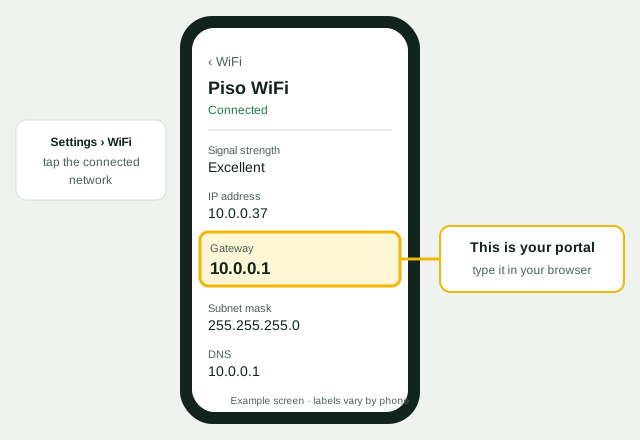
Your device already knows the portal address. Connect to the vendo's WiFi first, then look it up. Menu names vary by brand and version.
Android
- Open WiFi settings. Settings, then Connections or Network & Internet, then WiFi.
- Tap the connected network. Or tap the gear icon next to it.
- Find Gateway or Router. On some phones it is under Advanced or "View more".
iPhone
- Open Settings, then Wi-Fi. Tap the (i) next to the vendo's network.
- Read the Router line. That number is your portal address.
Windows 10 or 11
- Open Command Prompt. Search "cmd" in the Start menu.
- Type ipconfig. Press Enter and read Default Gateway under your WiFi adapter.
Mac
- Open System Settings, then Wi-Fi. Click Details next to the network.
- Open TCP/IP. Read the Router line.
Type the number you found in the browser address bar with http:// in front. For browser tips, see Piso WiFi login.
Tingnan ang Gateway o Router sa WiFi settings. Iyon ang i-type sa browser.
10.10.0.1 Piso WiFi pause time
Pause works the same on every portal address. Only the number in the address bar changes.
- Stay connected. Keep your phone on the vendo's WiFi.
- Open the portal. Type http://10.10.0.1, or the gateway you found.
- Tap Pause Time. Your countdown stops and the internet is cut.
- Resume later. Open the same address on the same phone and tap Resume.
- If there is no pause button, the owner has not enabled it.
- Paused time may expire after the owner's limit, often 30 to 60 minutes.
- Pause only keeps minutes you paid for. It does not give free time.
For every brand and button, read the main Piso WiFi pause time guide.
When 10.10.0.1 does not load
| Problem | Fix |
|---|---|
| Google results appear | Type the address in the address bar with http:// |
| "Site can't be reached" | Your machine uses another gateway. Check WiFi details. |
| Router login page appears | You opened the owner's router. Use the gateway shown while on the vendo WiFi. |
| Page loads forever | Turn off mobile data, VPN and Private DNS |
| Gateway shows 0.0.0.0 or nothing | Not fully connected. Forget the network and rejoin. |
More fixes are on Piso WiFi not working.
Owner note: changing the portal IP
Most owners never need to change the portal address. If you do, plan it carefully. The steps below are general and names vary by system.
- Write down the current settings. Note the old IP and DHCP range in case you need to go back.
- Open the admin page. Log in with your own admin account.
- Find the LAN or network settings. Look for a section often called Network, LAN or Hotspot.
- Pick a private address. Use a range that does not clash with your home router, such as 10.10.0.1.
- Save and reconnect. The admin page moves to the new address. Rejoin the WiFi and open it there.
- Update your signs. Tell customers the new address so they can still pause.
A wrong setting can lock you out. If that happens, see how to reset a Piso WiFi machine or contact your seller. This guide is independent and not affiliated with LPB, MikroTik, TP-Link or any vendo brand.
10.10.0.1 Piso WiFi FAQs
Is 10.10.0.1 a real Piso WiFi address?
Yes. Some machines use it instead of 10.0.0.1. Check your WiFi gateway to be sure.
How do I pause time on 10.10.0.1?
Open http://10.10.0.1 while connected and tap Pause Time. Open it again on the same phone to resume.
Does "10.10 0.1 piso wifi pause time" work with the space?
No. Remove the space and type 10.10.0.1 with three dots.
What is 10.10.10.1?
Another portal address used by some older or MikroTik-based machines. Make sure the last character is the number 1.
What is 10.5.50.1?
A common default on MikroTik hotspot setups. If it is your gateway, open it to reach the portal.
Should I open 192.168.1.1 to pause?
No. That is usually a router admin page for the owner. Customers use the vendo portal address.
How do I know which address my machine uses?
Look at Gateway or Router in your WiFi network details. That number is the portal.